
New Brunswick Guide to Billing for Virtual Care
Updated: April 21, 2025
In New Brunswick, physicians can bill for virtual care using the same fee codes and rates as in-person visits. This policy helps integrate virtual care into standard medical practice, ensuring continuity in compensation and care delivery.
Billing Overview
- Same Billing Codes: Use the exact codes for virtual services as you would for in-person consultations, including:
- Initial consultations
- Follow-up appointments
- Certain psychotherapy services
- Location Code: Use location code 19 to indicate a virtual visit.
- Clinic Classification: Rocket Doctor acts as a virtual extension of your practice, not a walk-in clinic, so billing is consistent with your own clinic submissions.
Submitting Claims via Medicare Claims Entry (MCE)
1) Log In
- Go to https://hps.gnb.ca/my.policy
- Use your GNB-assigned username and password.
- Navigate to Medicare Claims Entry (MCE).
2) Add a Claim

3) Enter the patient’s demographics
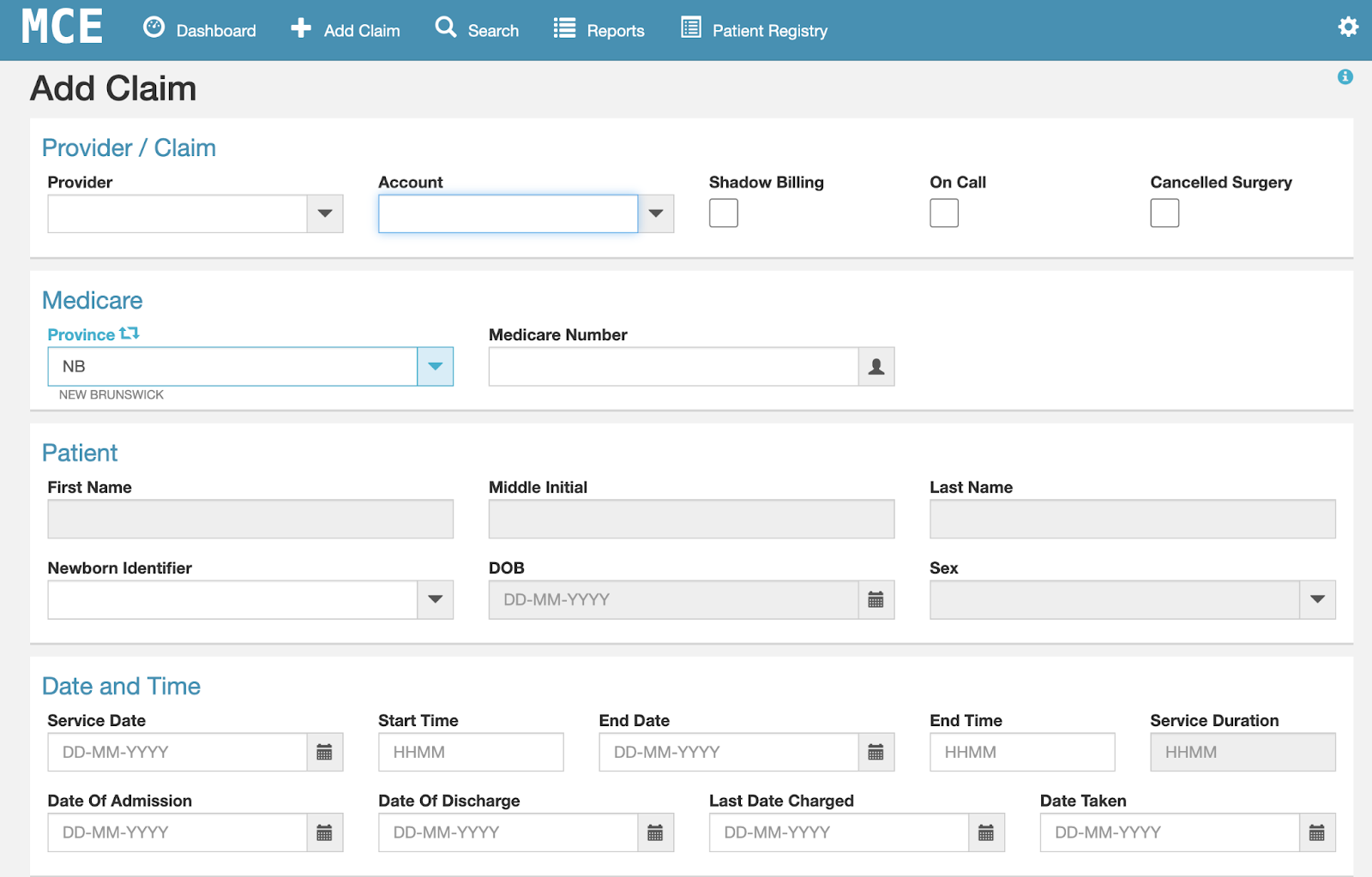
- Add the appropriate service code (e.g., 1 for a standard family medicine visit).
- Include the diagnosis and ICD-10 code.
- Set Location = 19 (virtual care).
- Use the same site code as your brick-and-mortar clinic.

Submitting Monthly Claims to Rocket Doctor
To ensure accurate reconciliation and timely payment processing, physicians practicing in New Brunswick are required to download their monthly claims from the Medicare portal and submit them to Rocket Doctor. This process allows Rocket Doctor to calculate and process your claims efficiently.
Steps to Submit Your Monthly Claims:
- Download Your Claims:
- Log in to the Medicare Claims Entry (MCE) Portal using your GNB-assigned credentials.
- Navigate to your submitted claims and download the relevant data for the month.
- Submit to Rocket Doctor:
- Access the Rocket Doctor Claims Submission Form: Claims Submission Form
- Upload your downloaded claims file and provide any additional required information.
Important Notes:
- Ensure that you submit your claims monthly to avoid any delays in processing.
- If you have questions or require assistance, please contact Rocket Doctor’s accounting team at: rdcanada.ar@rocketdoctor.io
✅ Remember to, mark this task as done in your onboarding checklist
Resources for Billing in New Brunswick
- New Brunswick Physicians' Manual (PDF)
Comprehensive guide to billing codes, procedures, and policies under Medicare.
- Physician’s Guide to Direct Billing (PDF)
A reference for charging patients directly for uninsured services.
- Medicare Claims Entry (MCE) Portal
Secure portal for submitting billing claims online using your GNB login.
- NBMS Practice Resources
Tools, guides, and billing support from the New Brunswick Medical Society.
- Physician Registration & Information
Government site with forms for registration, direct deposit, and practice setup.
- Guidelines on Charging for Uninsured Services
College of Physicians and Surgeons of New Brunswick (CPSNB) guidance on private billing.