
British Columbia Lab Setup Guide
Guide to Setting Up Lab Result Routing for Rocket Doctor
We understand the importance of receiving laboratory and imaging results directly to your e-fax number. To facilitate this, we have created a step-by-step guide to help you set up your account with common labs in BC.
Important Notes
- All faxes will be sent from Starship- MD Portal
- Your RD Fax Number
Address Requirement
Rocket Doctor is not a clinic, and its corporate address must not be used for lab setup. Instead, if you do not have an alternate clinical address, consider using a mail-forwarding service or a PO Box. Avoid using software platform addresses (e.g., OSCAR, Telus PSS, Accuro) as your clinic address.
Step 1: MD Portal Setup
- Log in to your MD Portal.
- Go to the Settings tab on the left-hand menu
- Under Account Information, confirm your personal information is correct
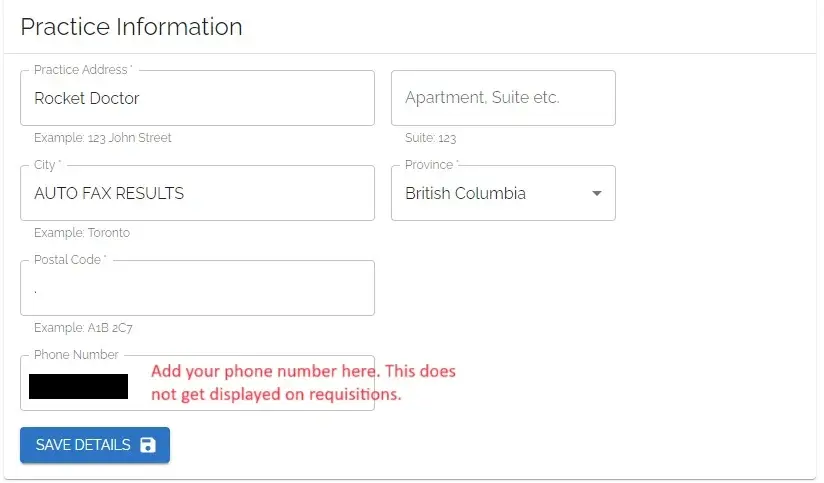
⚠️ Do NOT change your email address — doing so will lock you out of the platform - Under Practice Information, input:
- Address: Rocket Doctor
- City: AUTO-FAX RESULTS
- Postal Code: "." (a placeholder to allow saving)
- Phone and fax numbers will auto-populate.
Step 2: Lower Mainland Labs (PHSA / LMLabs)
Instructions:
Fill out the form:
- 📄 Form: British Columbia - LMLabs Provider Change Form
- 📘 Instructions: How to Fill the Form
Important: If you currently work at another clinic, select "Add a New Clinic" under the Request For section.
Submission options:
- 📧 Email: labphysupdates@phsa.ca
- 📠 Fax: 604-707-2601
Form Guidance:
- Requester Information Section: Use your personal details.
- Provider/Clinic/Facility Location Section: Choose "Provider Office."
- If you currently work at another clinic, select "Add a New Clinic" under the Request For section.
- Do NOT use Rocket Doctor’s address
- Include your contact details:
- Clinic/Facility Name
- Practice address/PO box
- Phone Number
- Fax Number (your Rocket Doctor eFax)
Email Excelleris to Confirm Fax Routing:
To ensure results are routed via fax, you must also email Excelleris:
Email: excelleris-support@lifelabs.com
Include:
- A request for fax-only delivery of lab reports (no electronic delivery via Excelleris Launchpad)
- Your completed LMLabs Provider Change Form (as an attachment)
- Your Rocket Doctor e-fax number
- Your name, practice address, and CPSBC licence number
- Please cc providersuccess.ca@rocketdoctor.io
Step 3: LifeLabs
Instructions:
1. Fill Out the Online Form:
Healthcare Provider Information Request
- Purpose of Healthcare Provider Information Update: NEW Request
- Province: Select BC
- Report Delivery: Choose Fax (⚠️ do NOT select EMR)
- Fax Number: Enter your Rocket Doctor fax number
- Current Clinic/Practice/Hospital Address: Use your own office, PO Box, clinic, or home address
(Important: do not list Rocket Doctor — we do not have a mailing address or staff monitoring mail) - Phone Number: Provide a direct line for urgent results
- Backup Physician: You can list yourself, a Rocket Doctor colleague, or ask Provider Success for help.
2. Submit the Form:
Submit online (no faxing needed).
3. Notify Provider Success:
Please email Provider Success once you’ve submitted the form so we can track your setup.
4. Verification Form:
- Within 5 business days, LifeLabs will send a fax verification form to your Rocket Doctor fax number.
- Please watch for this fax, sign it, and return it promptly.
- Results cannot be faxed to you until this step is complete.
- Provider Success will follow up in 5 business days to confirm the verification has been received.
- If you would like Provider Success to sign on your behalf, please include your consent when you email the team in Step 3.
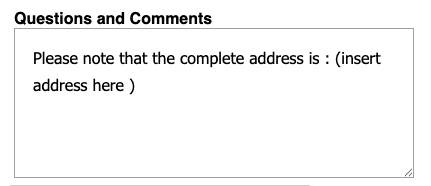
NOTE: For non British Columbia Address, please input your non BC address and select British Columbia on the dropdown list like below:
Then at the Questions and Comments section, please add a note like below:

Step 4: CPSBC Profile Update
To ensure results route correctly through regulatory profiles, update your CPSBC profile as follows:
- Building/Clinic Name: Dr. [Your Name]’s Rocket Doctor Practice
- Address: Virtual Care
- City: Use the city from your LifeLabs form, or “None” / “Not applicable”
- Postal Code: Match your LifeLabs form (must be in postal code format)
- Phone Number: 1-647-697-6973
- Fax Number: Your Rocket Doctor e-fax number
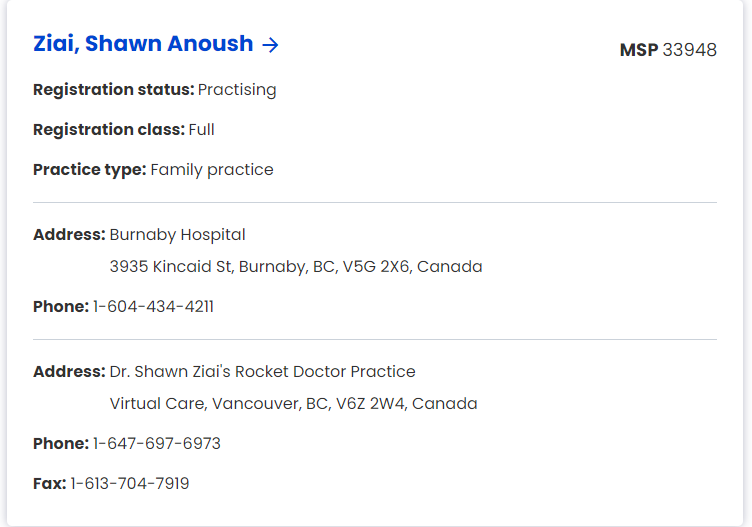
📝 This information is patient-facing, so it is important to reflect that you are an independent MD working on a virtual care platform.
Need Help?
📧 Clinical Support: clinicalsupport@rocketdoctor.io
📧 Provider Success: providersuccess.ca@rocketdoctor.io
✅ Once setup is complete, be sure to mark your onboarding task as done in Starship- MD Portal!